














MAXCOM KXT100
Technical Specifications:
- Hands-free function No
- Phone book number of entries n/a
- Alarm clock No
- LCD display / size 44 x 17
- Caller Identification YES
- Number of rings 1
Product description
Description
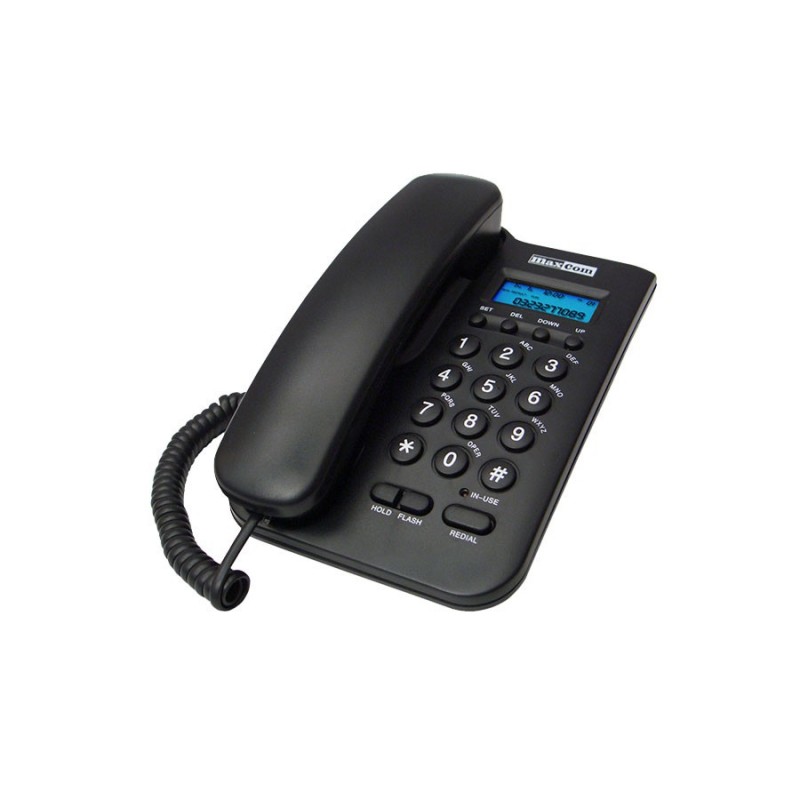
The Maxcom KXT100 is a classic corded phone that works well at home, in the office, at a reception desk, or at a service counter. Its easy-to-read display, CLIP caller ID, and REDIAL, HOLD, and FLASH functions give you convenient access to what you really need.
Key Features of the Maxcom KXT100
A major advantage of the Maxcom KXT100 is its simplicity: a classic keypad, an easy-to-read display, and features that are truly useful during calls. It works well wherever a phone needs to be quick to use and always ready for action.
Discover its benefits:
- easy-to-read display—lets you check basic information without delving into complex menus;
- Caller ID (CLIP)—helps you see who’s calling;
- REDIAL – redial the last number with a single button press;
- HOLD – lets you temporarily mute the microphone during a call;
- FLASH – a feature useful, for example, when working with a PBX;
- HI/LO ringer volume control – you can adjust it to suit the location of the phone;
- Busy line indicator – you can immediately see if the line is in use;
- Classic numeric keypad – makes it easy to dial numbers quickly without additional screens or apps.
What type of line should you connect the KXT100 to?
You can connect the Maxcom KXT100 to a standard phone line using a cable with an RJ connector. You don’t need a SIM card or Internet access—the phone uses a wired phone connection.
- The model supports both tone and pulse dialing, so you can adjust the dialing method to match the type of PBX serving the number.
- The FLASH feature also allows you to use the KXT100 with a private branch exchange (PBX), which is useful, for example, in an office, reception area, or service counter.
- If you’re looking for a simple phone for a traditional landline, the KXT100 is the perfect solution.
Simple everyday use!
The Maxcom KXT100 doesn’t require you to navigate a complex menu or memorize numerous settings. The large, classic keypad lets you dial numbers quickly, and the intuitive button layout puts the most important functions right at your fingertips.
REDIAL makes it easy to redial the last number, HOLD lets you temporarily put a call on hold, and FLASH comes in handy when handling calls through a PBX. This way, you don’t waste time searching for the right option when you just want to make or answer a call.
The corded design has another advantage: the device has a fixed location and is always ready for use. You don’t have to remember to charge the handset or wonder where you left it. It’s this predictability that makes the KXT100 a great fit for people who value quick access to basic functions and operation without unnecessary steps.
When should you choose the KXT100?
This model is for people who prefer classic operation and don’t need the advanced features found on cordless phones. The KXT100 focuses on easy access to calls, a clear keypad, and a fixed location for the device. This makes it easy to incorporate into your daily work or home routine.
It’s particularly well-suited for:
- at home—as a simple phone for everyday calls that’s always waiting in the same spot and doesn’t require you to remember to charge it;
- in the office—where the phone is mainly used for answering and making calls, and where fast, predictable operation is essential;
- at a reception desk or service counter—where a single phone is used by several people, and each of them should be able to easily find the most important functions;
- for those who value simplicity—if apps, additional settings, and complex menus are more of a hindrance than a benefit;
- as an additional landline phone—for example, for an office, a company room, or a place where you want constant access to a phone line.
If what you need most is reliable communication and you don’t want to pay for features you won’t use, the KXT100 is a very sensible choice.
Buy the KXT100 at Maxcom!
Are you looking for a simple corded phone that’s easy to use and always ready to go? Choose the Maxcom KXT100 and enjoy a clear keypad, useful features, and a classic design.
Check out the KXT100 at Maxcom and order it online!
Specifications
Additional information
| Hands-free function | No |
|---|---|
| Phone book number of entries | n/a |
| Alarm clock | No |
| LCD display / size | 44 x 17 |
| Caller Identification | YES |
| Number of rings | 1 |
| Backlit display | Yes |
| Backlit keyboard | No |
| Two-button memory | n/a |
| Random-access memory | n/a |
| Incoming call log | 40 |
| Outgoing call log | n/a |
| Repeating the last number | Yes |
| Call duration | Yes |
| Ringer volume control | HI/LOW |
| Light indicator for incoming calls | No |
| Putting a call on hold | Yes |
| Pause | No |
| Flash time (ms) | 100 |
| Muting the microphone | No |
| Compatible with hearing aids | No |
| Color | black / white |
| Brand | Maxcom |
User Reviews
This product does not have any reviews yet
About brand
Questions and Answers
I can’t make a call on the phone I bought.
Please verify that the number you are dialing is correct. When dialing a number in another country, always add the appropriate country code (e.g., Germany 0049 or +49). If you have a prepaid card, please check that there are sufficient funds in your account.
The SIM card is inserted; only emergency calls (112) can be made.
Make sure the SIM card is installed correctly.
My old SIM card doesn’t fit in my new phone.
Contact your mobile carrier’s nearest service center. They will replace your SIM card with the correct size to fit the SIM slot of your new phone.
How can I track the status of my shipment?
On the day we ship your package, you’ll receive an email with the tracking number and a link to track your shipment. Please note that the courier has 2 business days to deliver the package.
Will the courier call me before delivery?
Courier companies are not required to contact the customer by phone in advance. On the day the device is shipped, you will receive a message containing the tracking number and contact information for the courier company delivering the device. To determine the exact date and time of delivery, please contact the courier company directly.
Can I specify the exact delivery time for my package?
Please note that as a store, we are unable to specify the exact time of delivery by the courier company. On the day the device is shipped, you will receive a message containing the tracking number and contact information for the courier company delivering the device. To determine the exact date and time of delivery, please contact the courier company directly.
Related products