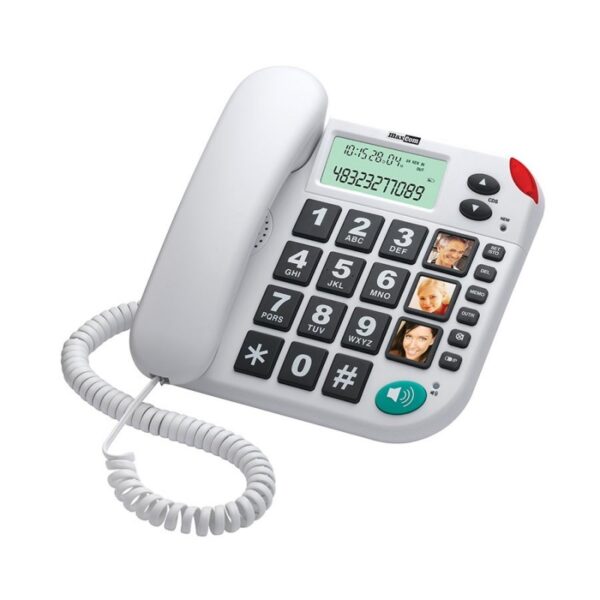















MAXCOM KXT481 SOS


Technical Specifications:
- Hands-free function YES
- Phone book number of entries n/a
- Alarm clock No
- LCD display / size 66 x 27
- Caller Identification YES
- Number of rings 1
Product description
Description
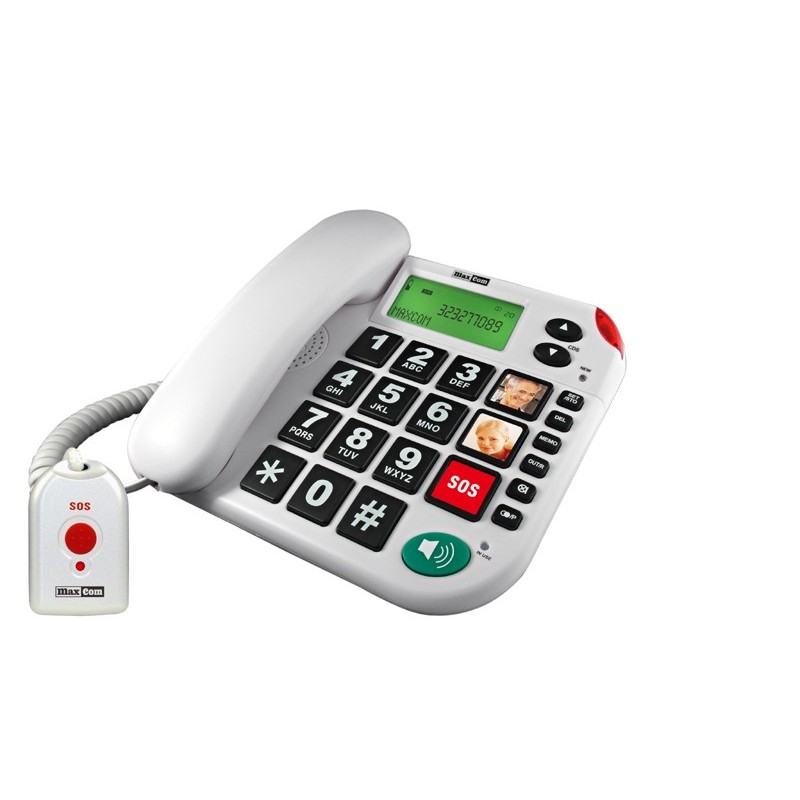
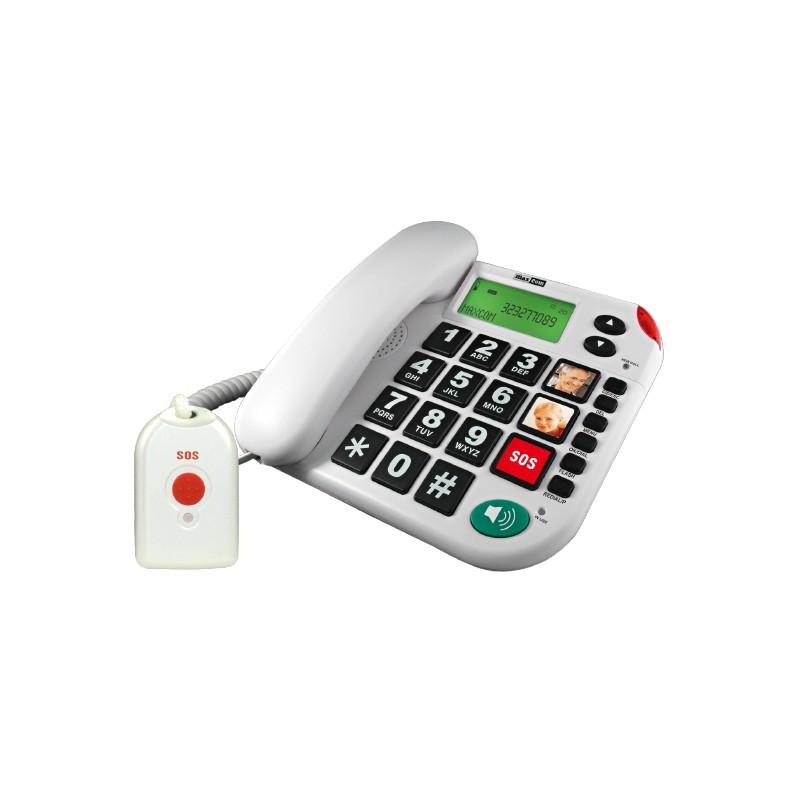
A landline phone can offer more than just the ability to make calls. The Maxcom KXT481 SOS features an emergency button and an included remote control, allowing you to initiate a call to pre-programmed contacts with a single action. This is a good solution for seniors or anyone who wants a simple way to call loved ones without having to look up a number and dial it manually.
How does the SOS button on the KXT481 work?
The SOS feature on the Maxcom KXT481 is designed to minimize the number of steps required in an emergency. The user does not need to look up a number in the phone book or dial it manually. The emergency procedure can be activated using the SOS button on the phone or remotely with the included 433 MHz remote control. Its range in open space is up to 40 m.
After activating SOS:
- the phone begins dialing the saved emergency numbers—you can set up to 5 contacts in advance and specify the order in which the KXT481 will call them;
- an emergency message is played—this can be a factory-set message or a message recorded by the user;
- the person answering the call presses “0” to accept it—at which point the KXT481 automatically switches to hands-free mode;
- The call lasts 2 minutes—at the end, the phone emits a warning tone. To extend it by another 2 minutes, the recipient dials “1” followed by “5”;
- if the first contact does not answer, the KXT481 moves on to the next emergency number. The phone attempts the next stored contacts until the call is answered.
The SOS procedure can be ended from the phone or the remote control. The person who answered the alarm can end the entire procedure by pressing “1” and then “9.” Simply hanging up is not enough—in that case, the KXT481 SOS landline phone will try to connect to the next person on the list. If you do not program any emergency numbers, the device will emit a loud alarm for 15 seconds after the SOS is activated.
KXT481 – Safety and Convenience for Seniors
The Maxcom KXT481 not only makes regular calls easier but also allows for quick contact with loved ones when the situation calls for it. Features that reduce the number of steps needed to make a call and help seniors use the phone more independently are particularly important here.
All features of the KXT481 include:
- an SOS button and an emergency remote control—if necessary, you can trigger an emergency procedure without manually dialing a number. The remote control also allows you to do this from a distance;
- up to 5 emergency numbers – loved ones can be saved in a specific order, and the phone automatically attempts to call them;
- M1 and M2 memory buttons – frequently used numbers can be assigned to separate keys, allowing you to call without entering the entire number;
- voice prompts – the phone can read out the numbers being dialed and also announce who is calling if a recorded name has been assigned to the contact;
- large display with adjustable contrast – makes it easier for people with low vision to read numbers and information;
- adjustable earpiece and ringer volume – allows the phone to be better tailored to the user’s hearing;
- compatibility with hearing aids – important for seniors who use such devices;
- Optical call indicator—a flashing light provides additional notification of an incoming call, even when the ringtone itself is easy to miss;
- hands-free mode – allows you to talk without holding the receiver to your ear;
- phone book for 30 contacts – you can save your most important numbers once and then dial them from the device’s memory.
Thanks to these features, the KXT 481 SOS landline phone gives seniors more freedom and provides their loved ones with an easy way to stay in touch.
How do you set up emergency numbers on the KXT481?
You can save up to 5 emergency numbers on the Maxcom KXT481. It’s a good idea to set them in an order so that the phone first tries to call the person most likely to answer quickly.
- Go to the SOS settings menu.
- Select a slot for the emergency number from 1 to 5.
- Enter the phone number of the selected person and confirm it.
- Add additional contacts in the same way.
- After saving the numbers, test the SOS function to make sure the calls are working properly.
This way, when the alarm is triggered, the KXT481 will automatically start contacting the saved contacts. Set up your SOS numbers right after connecting the phone so the emergency feature is ready when you really need it.
Check out the Maxcom KXT481 SOS at the Maxcom company store and choose a phone that makes everyday communication easier and, in an emergency, lets you quickly call your loved ones with the push of a button!
Specifications
Additional information
| Hands-free function | YES |
|---|---|
| Phone book number of entries | n/a |
| Alarm clock | No |
| LCD display / size | 66 x 27 |
| Caller Identification | YES |
| Number of rings | 1 |
| Backlit display | Yes |
| Backlit keyboard | No |
| Random-access memory | 3 |
| Incoming call log | 20 |
| Repeating the last number | Yes |
| Call duration | Yes |
| Ringer volume control | HI/LOW |
| Light indicator for incoming calls | Yes |
| Putting a call on hold | No |
| Pause | Yes |
| Flash time (ms) | 100/300/600 |
| Muting the microphone | Yes |
| Compatible with hearing aids | Yes |
| Color | white |
| Brand | Maxcom |
User Reviews
4.8/5


Based on 174 ratings

The average product rating is based on data from maxcom.pl and partner websites. When calculating this rating, we only take into account verified reviews backed by a purchase. Partners: Ceneo, Media Expert, MediaMarkt, RTV EURO AGD, Max Elektro, Orange, T-Mobile, Plus, Play
No user has added a review for this product yet
About brand
Questions and Answers
I can’t make a call on the phone I bought.
Please verify that the number you are dialing is correct. When dialing a number in another country, always add the appropriate country code (e.g., Germany 0049 or +49). If you have a prepaid card, please check that there are sufficient funds in your account.
The SIM card is inserted; only emergency calls (112) can be made.
Make sure the SIM card is installed correctly.
My old SIM card doesn’t fit in my new phone.
Contact your mobile carrier’s nearest service center. They will replace your SIM card with the correct size to fit the SIM slot of your new phone.
How can I track the status of my shipment?
On the day we ship your package, you’ll receive an email with the tracking number and a link to track your shipment. Please note that the courier has 2 business days to deliver the package.
Will the courier call me before delivery?
Courier companies are not required to contact the customer by phone in advance. On the day the device is shipped, you will receive a message containing the tracking number and contact information for the courier company delivering the device. To determine the exact date and time of delivery, please contact the courier company directly.
Can I specify the exact delivery time for my package?
Please note that as a store, we are unable to specify the exact time of delivery by the courier company. On the day the device is shipped, you will receive a message containing the tracking number and contact information for the courier company delivering the device. To determine the exact date and time of delivery, please contact the courier company directly.
Related products